
You have probably heard about Microsoft’s AI tools by now. Copilot shows up in your Word documents, Azure AI gets mentioned in tech news, and every software company seems to be announcing something new every week. But when it comes to actually choosing the right tool for your team or your business, things begin to get confusing.
That is what this blog focuses on. We are going to break down the two tools people ask about most: Microsoft Copilot and Azure AI Foundry. No tech jargon or vague promises. Just clear answers to the question you are probably already asking: which one do I need?
More than 90% of the Fortune 500 now use Microsoft 365 Copilot. While 80% of the Fortune 500 use Azure AI Foundry for their AI development work. Both tools are clearly being used at scale but by very different people for very different reasons.
For business users, IT leaders, and developers: by the end of this blog, you’ll know your best fit and how utilizing platforms like N+ are providing the training paths for getting teams started hands-on.
Microsoft’s AI Landscape
Microsoft offers a range of AI options, from simple helpers to full build-your-own platforms. Microsoft has been investing in AI since 2019, when it first partnered with OpenAI—the company behind ChatGPT. Since then, they have built AI into almost every product they make, from Word and Outlook all the way to the Azure cloud.
Main players in Microsoft’s AI world:
- Microsoft Copilot: An AI assistant built into the apps your team already uses every day.
- Azure AI Foundry: A developer platform for building custom AI applications from scratch.
What Is Microsoft Copilot?
Microsoft Copilot is an AI assistant that is already integrated into the Microsoft 365 apps that most of us already use, such as Word, Excel, PowerPoint, Outlook, and Teams, to help you get things done faster.
The simplest way to understand it is through examples.
Imagine you have a meeting coming up, but you have not read the 40-page briefing document. Copilot can summarize it for you in 30 seconds. Or maybe you missed a Teams meeting—Copilot gives you a recap of everything discussed and action items agreed on.
Think of Copilot as the part of your workday that handles the grunt work, so you spend less time on the stuff that drains you and more time on the stuff that matters.
It works across every major Microsoft 365 app, each in a way that matches how that app is used:
- In Word: Draft reports, edit for tone, rewrite sections in one click
- In Outlook: Summarize email threads, suggest replies, prioritize your inbox
- In Teams: Recap meetings, identify action items, catch up if you joined late
- In Excel: Analyze data, spot trends, explain what charts mean, no formulas needed
- In PowerPoint: Turn a Word document or briefing into a slide deck automatically
Early Copilot users reported saving up to 45% of their email management time. Editing time in Word dropped by 26% on average. JCB, the Japanese payment company, found employees saved roughly six hours per month after rolling out Copilot to 1,600 staff.
If you want to go deeper, N+ has a Microsoft 365 Copilot course that walks you through real-world use across Word, Outlook, Teams, Excel, and PowerPoint; no technical background is needed.
What About Copilot Studio?
Want to build your own AI assistant, like an HR chatbot or a customer-facing agent, without writing code? That is what Copilot Studio is for. It connects to your existing Microsoft 365 data and publishes directly into Teams, Outlook, or any website.
What Is Azure AI / Azure AI Foundry?
Azure AI Foundry is a pro-level platform for AI builders. It was rebranded from Azure OpenAI into a full hub for creating AI from scratch in the cloud.
It handles things like understanding text, spotting images, turning speech into notes, tweaking models to fit your data, and using RAG (smart search that pulls real info into answers).
Here is what it lets you do:
- Model access: GPT-4, GPT-4o and over 11,000 other AI models from OpenAI, Meta, Mistral, DeepSeek, etc.
- Fine-tuning: Train AI models on your own company data so they become experts in your specific domain
- RAG (Retrieval Augmented Generation): A technique that lets AI search your own documents and give precise, source-backed answers from them
- Speech, vision and language tools: Pre-built AI capabilities for converting speech to text, recognizing images, translating languages and more
- Developer tools: SDKs, APIs, command line tools and VS Code extensions so engineers can build and deploy AI apps anywhere
According to a IDC study cited at Microsoft Ignite 2024, companies investing in Azure AI solutions see an average return of $3.70 for every $1 spent. Azure AI Foundry now serves over 80,000 enterprises, including 80% of Fortune 500 companies.
Azure AI Foundry is not just for large tech firms. Organizations like Air India and ASOS have built an assistant to provide customers a personalized experience and reduce the volume of support significantly.
Looking to build on Azure AI Foundry? Browse N+’s Azure AI courses at nplus.global and find the right course for your team.
Azure AI vs Copilot: Comparison
Here’s a clear Azure AI vs Copilot breakdown:
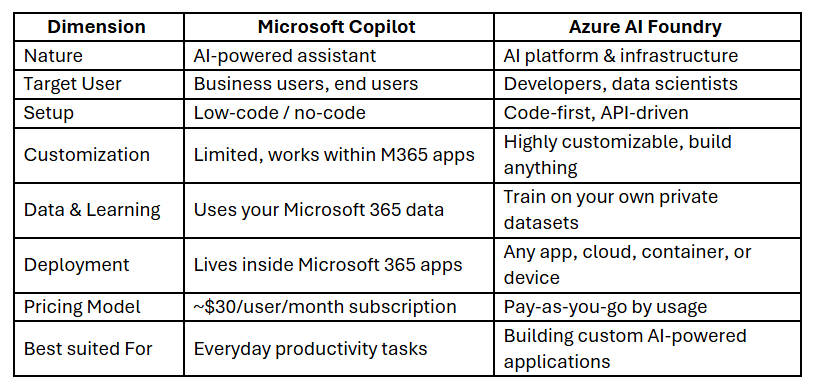
These tools are not competing. Copilot removes friction from everyday work. Azure AI Foundry removes limits for teams building something new. They are designed for different layers of the same AI strategy.
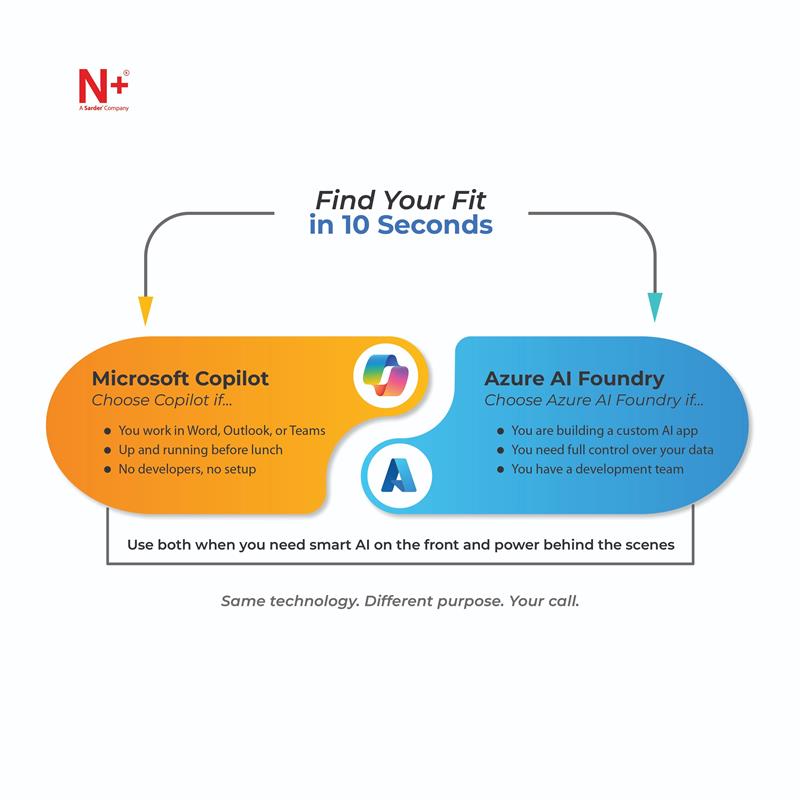
Why the Most Powerful Microsoft AI Setups Use Both Tools Together
You do not have to choose between Copilot and Azure AI Foundry. Microsoft designed them to work together, and the combination is much more powerful than either one alone.
Think of it this way: Copilot Studio is the front door, what your users see and interact with, whereas Azure AI Foundry is the engine room doing the heavy lifting behind the scenes.
How Does It Work?
Take a customer support chatbot as an example:
- A customer asks a question in the chatbot (built with Copilot Studio)
- The question is sent to Azure AI Foundry, which searches your internal documents using RAG
- A precise, source-backed answer is generated and returned to the user, within seconds
This setup works best for cross-functional teams, large enterprises running AI across departments, and organizations that want quick wins today while building something more powerful for tomorrow.
How to Choose Between Azure AI and Copilot?
Still thinking about which path is right for you? Here is a quick reference:
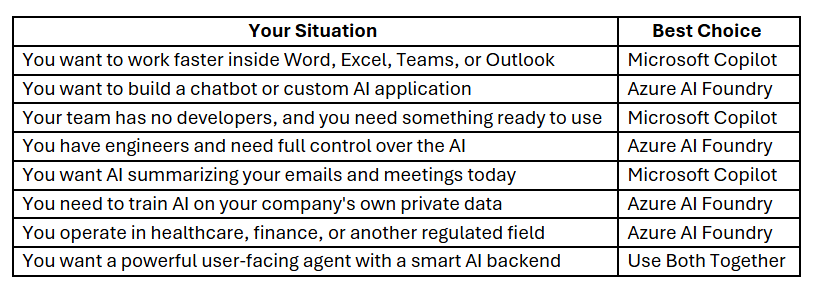
Want to dive deeper? Start with N+’s free guide: Elevating AI-led Productivity with Microsoft Copilot — a complete resource on adoption, best practices, and measuring AI impact in your organization.
Four Questions Worth Asking
- Are you a business user or a developer? If you are a business user, start with Copilot. If you have engineers and something to build, start with Azure AI Foundry. If you have both, use both.
- Do you need it running this week, or six months from now? Copilot activates within your existing Microsoft 365 license in a day. Azure AI Foundry takes more planning and developmenttime but gives you something far more tailored at the end.
- Is your environmentfullyMicrosoft or mixed? If your team lives inside Microsoft 365, Copilot is a natural fit. If you work across mixed platforms or non-Microsoft tools, Azure AI Foundry integrates more flexibly.
- What is your budget model? Copilot is per-userand predictable, while Azure AI Foundry is pay-as-you-go, which is cost-effective at low volumes but worth modeling carefully before a large rollout.
The Verdict and Where to Start
The Azure AI vs. Copilot question does not have one universal answer, and that is actually a good thing. Microsoft built these tools for different situations, teams, and stages of the AI journey.
- If you want to work smarter today, Microsoft Copilot is where you start. Fast, familiar, and getting stronger every quarter.
- If you want to build something—a fine-tuned model, an enterprise workflow, or a full AI application — Azure AI Foundry gives you the control to do it right.
- If you want the best of both, use Copilot Studio as the user-facing interface and Azure AI Foundry as the engine underneath. That is where the most powerful enterprise setups live.
Microsoft built a full spectrum of AI tools. Azure AI vs Copilot is not a competition but a choice based on where you sit on that spectrum.
The AI shift is underway. According to IDC’s 2025 CEO Priorities research, 66% of CEOs report measurable business benefits from generative AI. The tools are here. But knowing which tool to use is only half the battle. Knowing how to use it separates leaders from followers.
That is where N+ comes in.
Whether you are mastering Microsoft 365 Copilot or building on Azure AI Foundry, N+ gives you the courses and hands-on training to go from decision to deployment fast.
Where does your organization want to go with AI?
Let N+ take you there.